Bug #4602
openMobile App – Activity Upcoming : Follow-Up Date and Time Misplaced and Incorrect Date in Excel Export
0%
Description
Module: Reports – Activity Upcoming
Platform: Mobile App
Issue Type: Excel Export / Data Mapping
Note- Follow up date is showing incorrectly as 16-8-2026 instead of 17-8-2026
Description:
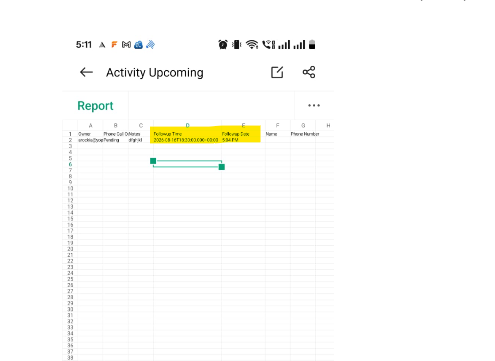
After exporting the Activity Upcoming Report from the Mobile App to Excel, the Follow-Up Date and Follow-Up Time are not displayed in the correct columns. Additionally, the exported Follow-Up Date is incorrectly updated/formatted compared with the actual report data.
Steps to Reproduce:
- Login to the Mobile App.
- Navigate to Reports → Activity Upcoming.
- Generate the report.
- Export the report to Excel.
- Open the downloaded Excel file.
- Verify the Follow-Up Date and Follow-Up Time columns and values.
Actual Result:
The Follow-Up Date and Follow-Up Time are misplaced in the exported Excel.
The Follow-Up Date is displayed with an incorrect date/value.
The exported date does not match the actual Follow-Up Date in the report.
The exported Excel data is not correctly mapped to the respective columns.
Expected Result:
Follow-Up Date and Follow-Up Time should be displayed under their respective columns.
The exported Follow-Up Date should match the actual date configured in the application.
The Follow-Up Time should be exported accurately without being shifted or misplaced.
The Excel report should maintain the correct column mapping and data format.
arockia@yopmail.com
Welcome@123
Files